


Pandora - Music & Podcasts
Pandora
I use Pandora as a background music companion rather than as a personal music library, and that distinction explains most of its appeal. The app is built around quick listening: I choose an artist, album, playlist, or podcast, press play, and let the service carry the session forward. That makes it especially comfortable when I do not want to spend ten minutes deciding what to hear next.
Developed by Pandora, this free Music & Audio app has become a familiar choice for people who want radio-style discovery alongside access to selected on-demand listening. It is available for Android and iOS, carries a Teen content rating, and includes optional in-app purchases ranging from $0.99 to $10.99 per item. I would not describe it as a perfect replacement for every streaming service, but it has a clear personality: it is strongest when I want a station that gradually understands my taste.
How I use Pandora for everyday listening
My usual workflow starts with a familiar artist or song. Instead of building a complete queue manually, I let Pandora turn that starting point into a longer listening session. This is useful during cooking, commuting, desk work, or a workout, when constant interaction with the phone is more distracting than helpful.
The first few minutes matter. When a station plays something that fits, I keep listening. When it misses, I use the available feedback controls rather than abandoning the station immediately. Over time, those choices make the station feel more personal. The important habit is to treat feedback as a steering wheel, not as a simple like button: repeated, honest reactions help shape the kind of music that follows.
I also find it useful to separate stations by mood or purpose. A broad station based on a favorite performer works well for casual listening, while a more focused starting point is better when I want a particular sound. If I create too many stations for tiny variations, the experience becomes harder to manage, so I prefer a small collection that I actually revisit.
Related News

Instagram Is No Longer a Photo App. It Is an Attention Engine

Microsoft Teams Mobile: When Collaboration Becomes Navigation

How the NFL App Adapts to Android and iOS Updates

Temu: Elevate Your Shopping Experience to Billionaire Status

Why Traffic Rider Works Best as a Precision Reflex Game

How Google’s Find Hub Transforms Everyday Searches
Pandora’s combination of artists, albums, playlists, and podcasts gives the home screen more variety than a pure radio app. I can move from music to spoken content without opening a different service. Still, the listening experience feels most natural when I accept Pandora’s recommendations instead of expecting complete control over every track.
A realistic example is a weekday morning when I have to leave quickly. I start an upbeat station while getting ready, allow it to continue in the car or through headphones, and use a quick rating only when a song is clearly right or clearly wrong for that moment. Later, I may switch to a podcast for a quieter commute. This routine is faster than searching for individual tracks, and the reduced decision-making is one of the app’s genuine strengths.
What the free experience feels like
The free price makes Pandora easy to try without committing immediately. That is valuable for casual listeners, families testing a shared listening habit, or anyone who mainly wants discovery. The trade-off is that the free experience is designed around Pandora’s service model rather than unlimited personal control. Depending on what I want to do, I may encounter interruptions or restrictions that would not suit someone who expects a fully customized, uninterrupted library.
Gallery
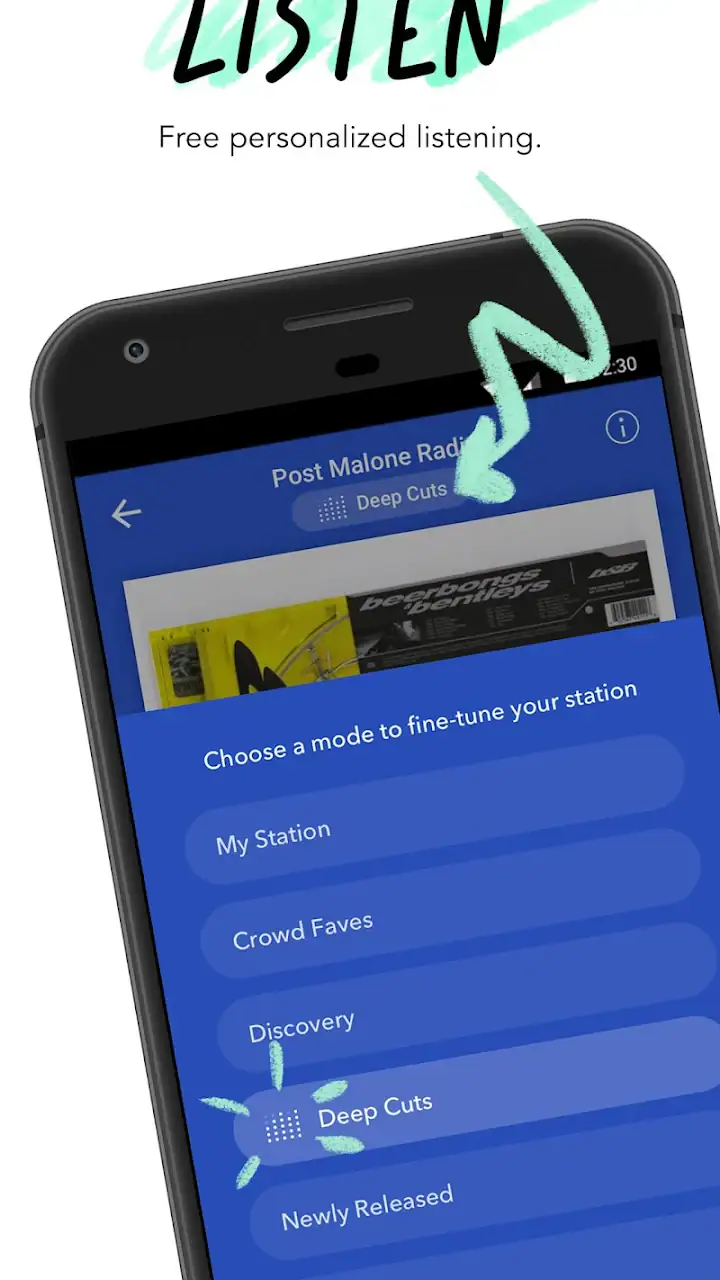
Optional purchases can change the experience, but I would not recommend paying before identifying the exact irritation you want to solve. If interruptions are the problem, a paid option may be relevant. If the real issue is wanting a huge personal collection with precise album and track management, paying for Pandora may not change the basic fit enough. I always test my normal routine first, because the right upgrade depends on how I listen rather than on the feature list alone.
Settings I check before settling in
I recommend opening the app settings early instead of assuming the default setup is ideal. I look for playback, notification, account, and data-related choices, then adjust them around my routine. A music app can become annoying when it sends more alerts than I need or behaves differently from how I expect when I switch between Wi-Fi and mobile data.
Notifications deserve particular attention. Pandora can be useful when it tells me about relevant listening activity, but unnecessary alerts quickly turn a relaxed music tool into background noise. I keep only the notifications that help me return to a station or podcast. This is a small change, yet it makes the app feel less demanding during the day.
I also check how the app behaves with headphones and car controls. The best setup is one that lets me pause, resume, skip, or change listening context without repeatedly unlocking the phone. I do not rely on every device behaving identically, so I test these controls before using Pandora during a drive or exercise session. That simple check prevents the common mistake of discovering a control problem when attention should be elsewhere.
For mobile data, my rule is conservative: I avoid treating streaming as automatically harmless just because the app is free. I review my phone’s data habits and prefer Wi-Fi when I am settling into a long session. If I am traveling, I plan ahead around the listening options available to my account rather than assuming that every song or podcast will be available in the same way offline.
Account organization is another overlooked area. I use one account consistently so that my stations and listening feedback remain connected to the same history. Switching accounts, reinstalling casually, or using separate profiles for similar listening can make recommendations feel less coherent. The more I rely on personalization, the more valuable consistency becomes.
Shortcuts that make the app faster
Experienced use is less about discovering a secret button and more about repeating a few efficient patterns. I keep my most useful stations easy to reach, start with a clear listening goal, and avoid browsing endlessly through every recommendation. Pandora works best when I give it a direction and then allow it to do the sorting.
One effective pattern is to create a station for a broad activity rather than for an overly precise emotional label. “Morning energy” can remain useful across many days, while a station built around an extremely narrow moment may become repetitive or difficult to steer. I then use feedback during real listening instead of trying to perfect the station before giving it time.
Another useful habit is to distinguish discovery from focused listening. When I want new music, I accept more variation and judge the station over a longer session. When I need concentration, I choose a familiar source and make fewer changes. Mixing these goals can make Pandora seem inconsistent when the real problem is that I am asking one station to perform two different jobs.
For podcasts, I approach the app differently. Music stations can keep moving in the background, while spoken content usually needs more deliberate selection. I check the episode title and context before starting, especially when I have limited time. If I am walking or doing chores, I choose a longer listening block; if I am between appointments, I avoid starting something that I cannot comfortably pause and resume.
I also use the app’s search as a launch point rather than a destination. Finding an artist or album is useful, but I quickly decide whether I want to listen directly, explore related music, or use that choice to start a longer station. This prevents the familiar trap of opening a music app for one song and spending the next several minutes scrolling.
The most useful Pandora habit is making fewer, better decisions. I choose a starting point, correct obvious misses, and let the service handle the next steps. That approach saves time and produces a more relaxed session than manually rebuilding a playlist every time I open the app.
Where Pandora’s recommendations help and where they miss
The recommendation model is most enjoyable when my starting point has a clear identity. An artist with a distinctive sound gives Pandora a useful foundation, while a vague or mixed starting point may produce results that feel less focused. I do not judge the whole app from one imperfect recommendation; I adjust the station and give it several listening sessions.
There is also a trade-off between familiarity and surprise. If I react positively to everything that sounds comfortable, the station may remain safe rather than adventurous. When I want discovery, I tolerate a few less obvious choices and avoid correcting every unfamiliar track immediately. That is a subtle but important difference between using Pandora as a passive radio and using it as a tool for expanding my taste.
On the other hand, listeners who already know exactly what they want may find the recommendation layer unnecessary. If I want a specific album in a specific order, a conventional on-demand music service can feel more direct. Pandora’s strength is reducing choice, so its advantage becomes smaller when total control is the main requirement.
Limits that experienced users should understand
The app is not equally suitable for every listening style. People who organize music into a carefully maintained personal library may prefer a service centered on albums, playlists, and precise queue control. Pandora is more convincing for listeners who enjoy stations and recommendations than for collectors who want to manage every detail.
Free listening also requires realistic expectations. The absence of an upfront charge is convenient, but it does not mean every premium-style behavior is included. I would not choose Pandora for a child’s unrestricted listening account without checking the content experience carefully, since the app is rated Teen. That rating is a useful reminder that the service is not designed as a dedicated children’s audio environment.
Podcast listening has its own limitations as well. A combined music-and-podcast app is convenient, but dedicated podcast applications often provide deeper tools for episode organization, subscriptions, playback queues, and long-term show management. If podcasts are my main reason for installing the app, I compare that workflow honestly rather than assuming the music features will transfer perfectly.
Recommendations can also become less useful when several people share the same account or device. One person’s feedback may influence another person’s stations, especially when tastes are very different. For a household with separate listening habits, individual accounts or a more library-focused service may be a better arrangement than trying to make one Pandora profile represent everyone.
Privacy and attention are practical considerations too. I review account and notification choices, and I avoid granting the app more room in my day than I actually want. Music should support my routine, not constantly interrupt it. Turning down unnecessary alerts and keeping a clear listening purpose makes the experience feel much more controlled.
How it compares with familiar alternatives
Compared with a traditional radio app, Pandora gives me more influence over the station’s direction and a stronger connection between my feedback and future listening. Traditional radio can be wonderfully effortless, but it usually offers less personal steering. Pandora occupies the middle ground: more adaptive than broadcast radio, yet less manually controlled than a full on-demand catalog.
Compared with a playlist-first streaming service, Pandora asks me to surrender more control in exchange for convenience. A playlist service is better when I have a precise plan, want to arrange a sequence, or need a particular album immediately. Pandora is better when I have a mood, an artist, or an activity and want the app to fill in the rest.
Compared with a dedicated podcast app, Pandora is appealing when I move casually between music and spoken audio. A specialist podcast tool is usually the better choice for someone following many shows, tracking episodes carefully, or building a detailed listening queue. I see Pandora as a useful combined environment, not automatically the best specialist tool for either category.
Its scale is reassuring for a mainstream service. Pandora has an average rating of 3.9 from over three million ratings, with more than eight hundred thousand written reviews and over one hundred million installs. Those figures show broad adoption, but they should not replace personal testing: a large audience can include listeners with very different expectations about radio discovery, free access, and on-demand control.
Who should use it and who should skip it
I recommend Pandora to people who want music quickly, enjoy discovering related artists, and do not want to curate every minute of a session. It is particularly comfortable for background listening, casual exercise, household chores, and commutes where a station can keep playing without constant input. It is also a sensible first try for someone who wants both music and podcasts in one familiar app.
I would steer away from it if my priority were a meticulously managed library, exact playback control, or a dedicated podcast workflow. I would also hesitate if I disliked recommendation-driven listening or found interruptions unacceptable. In those cases, a different streaming model is likely to feel more natural from the beginning.
Before deciding, I would run three tests. First, start a station from an artist I know well and see whether its direction feels comfortable after a full session. Second, try the app during the real situation where I plan to use it, including headphones or car controls. Third, check whether the free experience fits my tolerance for interruptions and restrictions. These tests reveal more than browsing the app for a few minutes.
My final view after building a routine
Pandora succeeds because it removes friction from the first play. I can begin with a familiar name, let the service develop the session, and make small corrections instead of managing a complete queue. Its best qualities appear after I build repeatable habits around stations, feedback, notifications, and data use.
It is not the universal answer for music and podcasts. The same hands-off design that makes it relaxing can feel limiting when I want exact albums, detailed playlists, or specialist podcast tools. The free entry point is friendly, while optional purchases should be judged against the specific limitations they address rather than treated as an automatic upgrade.
For my own use, Pandora earns a place when I want a dependable stream with a personal touch and minimal decision-making. I recommend trying it with a clear purpose, keeping the settings restrained, and giving its recommendations honest feedback. Choose Pandora for guided listening, not for complete ownership of every playback decision. That expectation makes the app feel focused, practical, and much easier to judge fairly.
FAQs for Pandora - Music & Podcasts
What is Pandora and how does it work?
Pandora is a music streaming app offering personalized music discovery. It uses the Music Genome Project to suggest tracks based on your preferences. Users can create stations by selecting an artist or song, and Pandora curates similar tracks. Available on both Android and iOS, it provides both free and premium subscription options.
Is Pandora available offline?
Yes, Pandora offers offline listening, but this feature is only available to subscribers of Pandora Plus and Pandora Premium. Users can download stations, playlists, or albums to enjoy without an internet connection. The availability of offline content depends on the subscription tier and device storage.
What are the differences between Pandora's subscription plans?
Pandora offers three tiers: Free, Plus, and Premium. The Free version includes ads and limited skips. Plus provides ad-free listening, unlimited skips, and offline listening for stations. Premium offers all Plus features along with the ability to create playlists, download specific songs, and play any track on demand.
How does Pandora's personalized recommendation system work?
Pandora uses the Music Genome Project, analyzing over 450 musical attributes to recommend songs. As you listen and interact with tracks—by liking or disliking them—Pandora refines its suggestions. This ensures a tailored experience, providing users with new music that aligns with their tastes.
Can I share my music and playlists on Pandora?
Yes, Pandora allows users to share stations, songs, and playlists with friends via social media, email, or direct links. Premium subscribers have the added benefit of sharing specific playlists they've created. This feature enhances the social aspect of music discovery, enabling users to connect through shared musical interests.
Pros
- Extensive music library available.
- User-friendly interface design.
- Customizable playlists and stations.
- Offline listening with Premium.
- Personalized recommendations.
Cons
- Frequent ads in free version.
- Limited skips for non-premium users.
- Occasional buffering issues.
- Some features require paid subscription.
- Podcast selection is limited.


